

Скачать Traffic Shaper XP – Инструмент управления сетевым трафиком
Обзор Traffic Shaper XP
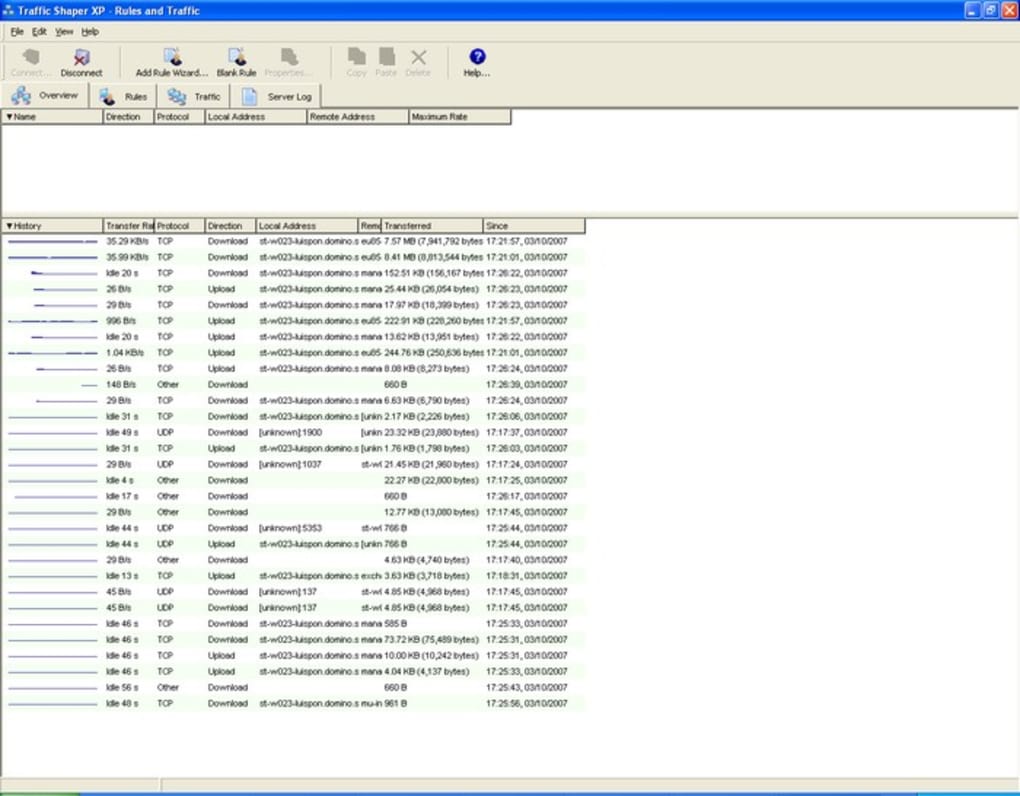
Traffic Shaper XP — это лёгкое, но мощное средство мониторинга сети и контроля пропускной способности, разработанное для небольших и средних сред. Оно предоставляет просмотр в реальном времени каждого пакета, проходящего через сеть, отображая важные детали, такие как тип протокола, IP‑адреса источника и назначения, MAC‑идентификаторы, имена доменов, номера портов, длительность соединения и точную скорость каждой передачи. Объединяя эти данные в интуитивно понятной панели, сетевые администраторы могут мгновенно обнаруживать аномалии, выявлять «прожорливые» приложения и диагностировать всплески задержек без необходимости копаться в сложных файлах журналов.
Приложение делает больше, чем просто наблюдает за трафиком; оно даёт администраторам возможность формировать его. С помощью простого мастера пользователи могут создавать правила формирования трафика, которые приоритетизируют критически важные приложения, резервировать полосу пропускания для VoIP или видеоконференций и ограничивать ресурсоёмкие сервисы, такие как peer‑to‑peer загрузки, в рабочие часы. Эта двойная возможность — видимость плюс контроль — делает Traffic Shaper XP незаменимым инструментом для тех, кто хочет поддерживать плавную и предсказуемую работу сети.
Одной из выдающихся функций является режим без сервера (Server‑Free Mode), позволяющий программе работать без выделенного шлюза или сервера. Даже в средах, где все компьютеры выступают в роли равноправных узлов, Traffic Shaper XP может справедливо распределять полосу пропускания между всеми пользователями, гарантируя, что ни одно устройство не монополизирует соединение. Хотя разработчики заявляют о широкой совместимости с основными брандмауэрами и серверными платформами, они признают возможные конфликты с сильно кастомизированными правилами брандмауэра. Тем не менее, инструмент остаётся надёжным выбором для администраторов, которым нужен бесплатный, безопасный и регулярно обновляемый решение для мониторинга и формирования трафика.
Core Features & Capabilities
- Визуализация трафика в реальном времени с деталями протокола, IP, MAC и домена.
- Мастер распределения пропускной способности для создания приоритетных правил.
- Режим без сервера для peer‑to‑peer сред.
- Настраиваемые оповещения о необычных всплесках трафика.
- Поддержка основных брандмауэров и серверного ПО (например, Windows Firewall, pfSense).
- Подробный журнал и экспорт в CSV для исторического анализа.
- Лёгкий footprint — работает на скромном оборудовании без снижения производительности.
Pros
- Интуитивный интерфейс, требующий минимального обучения.
- Бесплатен для загрузки и использования, с регулярными обновлениями безопасности.
- Режим без сервера устраняет необходимость в дополнительном оборудовании.
- Тонкий контроль над отдельными приложениями и портами.
- Низкое потребление CPU и памяти.
Cons
- Возможные конфликты с сильно кастомизированными правилами брандмауэра.
- Отсутствие глубокого анализа пакетов для корпоративного уровня.
- Нет нативного мобильного приложения для удалённого мониторинга.
- Продвинутые функции отчётности ограничены по сравнению с платными решениями.
- Резервное копирование/экспорт конфигураций выполняется вручную, а не автоматически.
Overall Rating: 4 out of 5 stars – Traffic Shaper XP offers a solid blend of visibility and control for small networks, though enterprises may need more advanced analysis tools.
Installation, Usage & Compatibility
Step‑by‑Step Installation
- Download the installer from the official website (ensure you use the HTTPS link for a secure download).
- Run the .exe file (Windows) or .dmg file (macOS) and follow the on‑screen wizard.
- During setup, choose between “Standard Mode” (requires a server/gateway) or “Server‑Free Mode” for peer environments.
- Allow the program to configure the required network adapter permissions; you may need administrator rights.
- After installation, launch Traffic Shaper XP and let it scan your network interfaces.
- Use the built‑in wizard to create your first bandwidth‑shaping rule – the assistant guides you through selecting applications, setting priority levels, and defining time windows.
How to Use the Dashboard
Upon launch, the main dashboard presents a live graph of inbound and outbound traffic, broken down by protocol (TCP, UDP, ICMP, etc.). Clicking any bar expands a detailed view showing source/destination IPs, MAC addresses, and the specific ports involved. The “Rules” tab lets you add, edit, or delete shaping policies. For quick adjustments, right‑click any active flow and select “Prioritize” or “Limit” to apply an ad‑hoc rule that lasts until the session ends.
Logs are accessible via the “History” tab, where you can filter by date, protocol, or IP range. Export options include CSV and JSON, facilitating integration with external monitoring platforms such as Grafana or Splunk. Alerts can be configured to send email notifications when traffic exceeds predefined thresholds, helping you react proactively to potential DDoS attacks or misbehaving applications.
Operating System Compatibility
Traffic Shaper XP is built for the following platforms:
- Windows 10, Windows 11, and Windows Server 2016‑2022 (64‑bit).
- macOS 10.15 (Catalina) and later.
- Linux distributions with kernel 4.15+ (Debian, Ubuntu, CentOS) – use the .deb or .rpm packages.
- Android and iOS are not supported; the tool focuses on desktop and server environments.
For Windows users, the installer automatically registers a service that runs in the background, ensuring continuous monitoring even after reboots. macOS users will need to grant “Full Disk Access” and “Network Extension” permissions during the first launch. Linux users should run the installation script with sudo privileges to create the necessary systemd service.
Frequently Asked Questions
Can Traffic Shaper XP work alongside my existing firewall?
Yes, the application is designed to coexist with most mainstream firewalls such as Windows Defender, pfSense, and Cisco ASA. However, if you have highly customized firewall rules that block certain ports, you may experience conflicts. In such cases, add Traffic Shaper XP to the firewall’s exception list.
Is there a limit to how many shaping rules I can create?
The free version allows up to 25 simultaneous rules. For larger deployments, the premium license removes this restriction and adds advanced scheduling options.
How does Server‑Free Mode distribute bandwidth fairly?
In Server‑Free Mode, the application monitors each client’s current usage and dynamically adjusts limits so that no single device exceeds its allocated share. It uses a round‑robin algorithm combined with real‑time traffic analysis to maintain balance.
Can I export traffic logs for compliance reporting?
Yes, Traffic Shaper XP provides CSV and JSON export options. You can schedule automatic exports to a network share or integrate with external SIEM tools for compliance audits.
Is the software free or do I need to purchase a license?
Traffic Shaper XP offers a fully functional free edition that includes core monitoring and basic shaping capabilities. A paid Pro license unlocks advanced reporting, unlimited rules, and priority support.
Conclusion & Call to Action
Traffic Shaper XP delivers a compelling mix of real‑time network visibility and practical bandwidth‑shaping tools without demanding a hefty investment. Its clean interface, Server‑Free Mode, and straightforward rule‑wizard make it an ideal choice for small businesses, educational institutions, and home offices that need to keep their networks running smoothly. While it may not replace enterprise‑grade DPI solutions, its low resource usage and free pricing model provide excellent value for the majority of users.
If you’re looking to gain control over your network traffic, reduce congestion, and prioritize mission‑critical applications, downloading Traffic Shaper XP today is a smart first step. Click the button below to start the secure, free download and begin shaping your network for optimal performance.







